
Vibe Check #3: Your App Doesn't Need a 50-Page Spec. It Needs This.
The Boring Phase That Will Save You From Immense Headaches Down the Road

Welcome back.
In Vibe Check #1, I told you to write a product spec before letting Claude anywhere near your codebase. I said to use AI tools to create a working plan, listed out all the sections you should cover - vision, user flows, architecture, database schema, APIs - and then said: “Make sure to read the document very carefully.”

Good advice, but I gave you zero tools to actually do it.
This post fixes that.
By the end of this post, you’ll have a minimal product document for your app, the exact prompt I used to create mine (after two failed attempts), and a real example from Circles you can use as a template. No code or database schemas. Just the thinking that should happen before any of that exists.
How I Did It The First Time (Don’t Do This)
Let me set the scene.
It’s late. I have Claude Code open. I have an idea that lives somewhere between a mood board, a Notes app entry from 2 AM, and a general sense of enthusiasm.
I type this into Claude (I know I’m not the only one here):
Build me a social app where people get matched into small groups based on interests and location. Use React Native and Supabase.
That’s it. That was the entire brief for my app.
Claude did what Claude does. It delivered. FORTY SEVEN FILES.
A database schema with twelve tables.
An authentication flow with phone verification AND social login.
I just wanted email and password. A notification system. A matching algorithm. An activity feed with its own separate chat system. It compiled. It ran once and then crashed out.

Claude doesn’t tell you when your brief is too vague. It doesn’t say, “Hey, you haven’t actually told me what this app does.” It just fills in the blanks. Confidently. Competently. With decisions you didn’t even know you were outsourcing.
(I am writing about the aftermath of this in Vibe Check #5. Hours of debugging code I’d never actually read. I have not emotionally recovered.)
The Document Nobody Wants to Write (Including Me)
Let’s be honest. Nobody wakes up excited to write a product document.
The phrase alone sounds like something a project manager sends you on a Monday morning with “Thoughts?” in the subject line. Product docs feel corporate. They feel like overhead. They feel like the thing you write instead of building.
I get it. I felt the same way.
But what I learned after the 47-file disaster is that when you skip the product doc, you don’t skip the decisions. You just let Claude make them for you. And Claude will make them. Every single one. Without asking. Without hesitating. Without telling you that it guessed.
The product doc isn’t primarily for Claude, though. It’s for YOU. Writing it forces you to answer the questions you’ve been avoiding:
- What happens when someone tries to join two circles at once?
- Can you block someone mid-conversation, and what happens to the messages they already sent?
- What does “weekly prompt” even mean? Who writes them? Are they randomized?
- What does “matching” actually mean? Random? Interest-based? Location-based? All three?
Every one of those questions you dodge in the document is one Claude will answer for you. In code. Without checking.
So why minimal? Why not write a proper 50-page spec like an experienced PM?
Because a 50-page spec is dead on arrival, it becomes outdated the moment you start building. You end up maintaining a document instead of maintaining a codebase. The goal is a living document. Short. Opinionated. Honest about what it doesn’t know yet. One page, maybe two. Something you’ll actually reopen next week.
The product doc is the contract between your idea and your codebase.
The Prompt That Does the Thinking For You (Almost)
Here’s the thing most prompt advice gets wrong: it treats the prompt as the final product. “Use this magic prompt, and Claude will generate your perfect spec!” No.
The prompt is a conversation starter. Its entire job is to force *you* to think. Not to save you from thinking.
Let me show you what I tried first, so you can skip my mistakes.
Attempt #1: The Corporate PRD
“Write me a product requirements document for my app.”
Claude produced a 3,000-word document with sections like “Stakeholder Analysis,” “Success Metrics,” and “Risk Mitigation Strategy.”
Technically impressive.
Totally useless for one person building a side project on weekends.
Attempt #2: The Vague Brief
“Write a brief spec for Circles, a social app for making friends in small groups.”
Better. But Claude guessed at everything I didn’t specify. It included direct messaging, social login, an activity feed, a premium tier, and a matching algorithm that sounded like it needed a PhD to implement. Half the features weren’t ones I wanted. The scope was just whatever Claude thought “a social app” should include.
Attempt #3: The One That Actually Worked
I stopped asking Claude to write the document. I asked Claude to ask me questions first.
That changed everything. Here’s the prompt. Copy it. Modify the first line. Use it.
I'm building [one-sentence description of your app].

I need your help creating a minimal product document — just
enough to align on what we're building before we write any code.

Don't write code. Don't design the database. Don't pick
libraries. Just help me think through these five things:

1. Problem: What specific problem does this solve? Not
   "people want X" — what's the actual pain point someone
   feels today?

2. Solution: How does the app solve it? 2-3 sentences max.
   If you can't explain it in 2-3 sentences, the idea isn't
   clear enough yet.

3. V1 Scope: What features are IN v1? What features are
   explicitly OUT? The OUT list is more important than the
   IN list.

4. Core user flows: Walk through 2-3 key journeys a user
   takes, step by step. Start from "user opens app" and
   end at "user accomplished the thing."

5. Open questions: What are the 3-5 biggest product
   decisions I haven't made yet?

But before you generate anything — ask me 5-10 clarifying
questions about my idea first. I want to think through the
answers myself, not have you guess them.
Why Each Piece Matters
I’m not going to just hand you a prompt and say “Trust me, bro.” That’s the opposite of what this series is about. So here’s why each line is doing work:
“Don’t write code. Don’t design the database.” Without this line, Claude jumps straight to implementation. It will suggest Postgres schemas and API routes before you’ve decided what your app actually does. You need to physically hold it back from building until you’ve finished thinking.
“The OUT list is more important than the IN list.” This was my single biggest lesson from Circles. Every feature you don’t explicitly exclude, Claude will helpfully include.
Voice intros? Sure.
In-app payments? Why not.
Multiple circles per user? Sounds useful!
And then you’re building five features you never asked for and debugging systems you don’t understand. The NOT list is a scope fence. Build it tall.“Ask me 5-10 clarifying questions first.” This is the whole trick. This single line changes the entire dynamic. Instead of Claude producing a document you passively read, Claude produces questions you actively answer. And the questions are revealing. Claude asked me things like:
What’s the core pain point you’ve personally felt or watched someone feel?
What does “success” look like for one user in week 1?
Activity vs. hangout — is there structure?
Is “coffee run” a literal thing (everyone meets at a specific Blue Bottle at 4 pm) or a vibe (”someone wanna grab coffee this
week?”)? The first is a product; the second is a group chat.
Questions I absolutely had not thought about. My answers to those questions became the backbone of my product doc. Claude didn’t write my document. Claude interviewed me until I could write it myself.
What I got back?
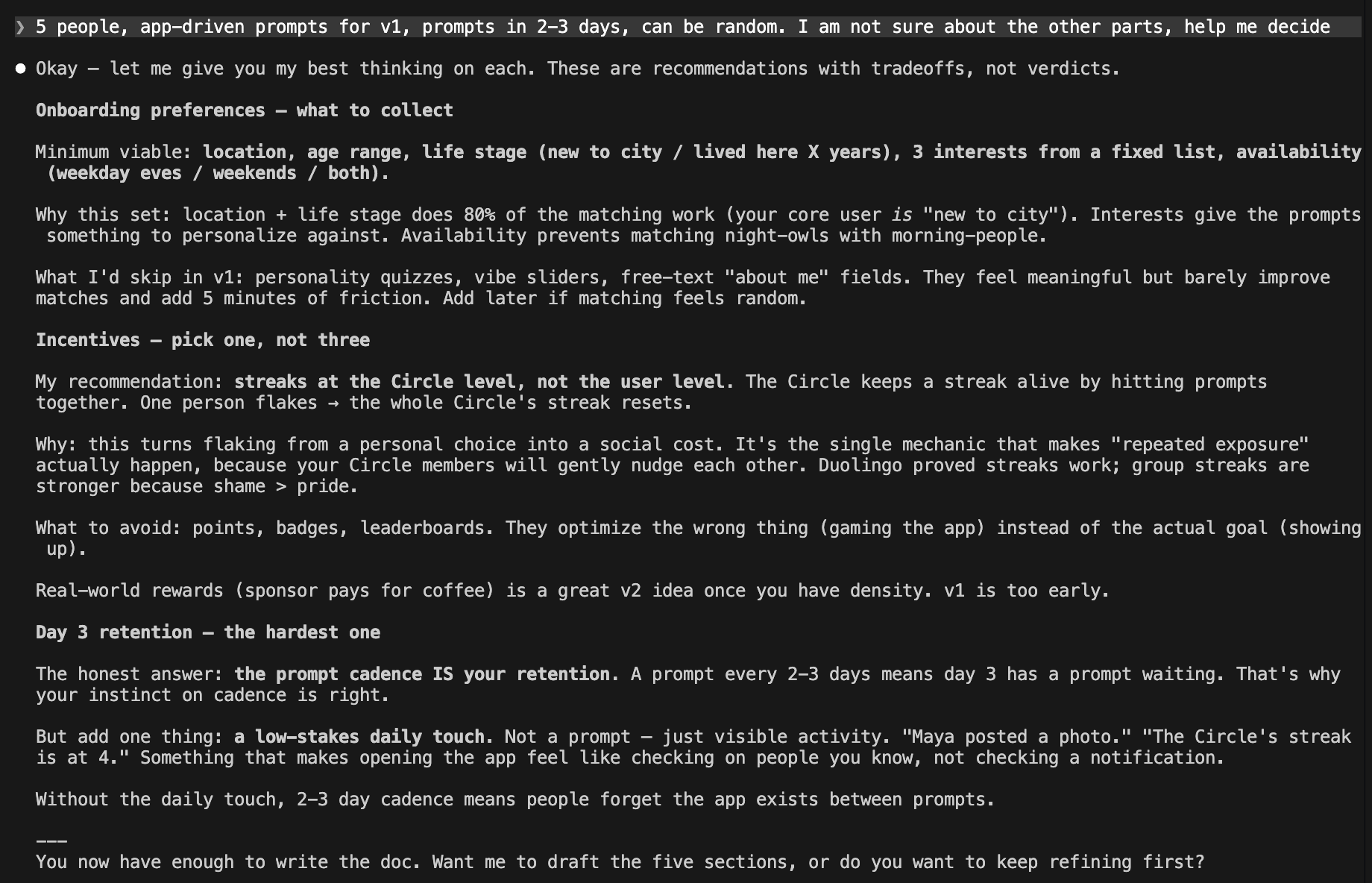
Claude came back with so many questions. Some of them made me go “oh, I genuinely don’t know.”
That honesty saved me weeks. Because when those questions came up during development, I already knew they were unresolved. No surprises. No mid-build existential crisis about what the app is supposed to do.
(Okay, fewer mid-build existential crises. Let’s not get carried away.)
What Mine Looks Like (Stripped Down)
Here’s the actual minimal product doc for Circles. Not the full plan document (that grew to 2500 lines over time - because it’s a living doc and it, well, lived). This is the starting version. The one I wrote before a single line of code existed. One page.
Circles — Product Doc v1.0

  1. Problem

  Moving to a new city is lonely, and the existing options for fixing it don't work.
  Meetups are too big and too shallow — you meet 30 people once and remember none of them.
  1-1 coffee with a stranger is high-stakes and intimidating.
  Friendships actually form through repeated exposure to the same small group over time,
  but no product is built around that mechanic.
  People are stuck choosing between awkward 1-1s and crowded events that don't lead anywhere.

  2. Solution

  Circles assigns you to a persistent group of 5 people nearby, matched on life stage and interests.
  Every 2-3 days, the app sends the Circle a prompt — sometimes "go grab coffee together this week and post a photo,"
  sometimes a chat-only question.
  The same five people keep showing up for each other, and friendship happens as a side effect of the cadence.

  3. V1 Scope

  IN v1:
  - Email/password auth	- Sign up and log in with email and password
  - Onboarding: location, age range, life stage (new to city / established), 3 interests from fixed list, availability (weekday
  eves / weekends / both)
  - Matching algorithm assigns user to a Circle of 5 based on preferences + distance
  - Persistent Circle chat (group messaging + photo sharing)
  - App-driven prompts every 2-3 days, mix of IRL prompts and chat prompts
  - Leave-Circle flow; new user auto-rotates in from the waitlist
  - Circle-level streak (resets if a prompt goes unanswered by the group)
  - Lightweight daily touch — a feed-style view showing recent Circle activity ("Maya posted a photo," "Streak: 4")
  - Push notifications for new prompts and chat messages

  OUT of v1 (explicitly):
  - User-created activities (Costco runs, custom hangouts) — comes later once app-prompts prove the loop works
  - Multiple Circles per user — one Circle, full attention
  - Voice/video features
  - 1-1 DMs between Circle members
  - Profiles beyond first name + photo
  - Personality quizzes, vibe matching, free-text bios
  - Real-world rewards or sponsor partnerships
  - Web app (mobile only — this is a notification-driven product)
  - Discovery / browsing other Circles
  - Public photo feed beyond the Circle
  - Events, RSVPs, calendar integration
  - AI-generated prompts (curated list for v1)
  - Cross-city matching, travel mode
  - Paid tier, subscriptions (not until people actually use it)

  4. Core User Flows

  1. Onboarding:
    Open app → Welcome screen → Enter email & password →
    Set name → Write bio → Set location → Pick languages →
    Pick interests (3-10) → Done → Home screen

  2. Getting matched:
    Home screen → "Find my circle" → Matching screen (brief wait) →
    Matched! → See circle members → Circle chat opens

  3. Receiving a prompt:
    Circle chat → New prompt arrives ("Share your favorite
    local coffee spot") → Members respond in chat →
    Conversation flows from prompt

  5. Open Questions

  1. What happens when a prompt is ignored? Does the streak die immediately, or does the Circle get a grace period? Does the app
  re-prompt or stay quiet? This is the single biggest design call left.
  2. How do you bootstrap matching in low-density areas? Tokyo works because there are thousands of users. What about the 50th
  user in Lisbon? Do you wait until you have 5 nearby, or match looser and let people opt out?
  3. Are prompts the same for every Circle, or personalized? Same prompts are simpler and create shared cultural moments ("did
  your Circle do the coffee one?"). Personalized prompts feel more relevant but are operationally heavier and harder to curate
  well.
  4. What's the right onboarding for the waitlist experience? If a user signs up and there's no Circle ready, what do they see?
  An empty app for 3 days will kill them before they ever get matched.
  5. Does the Circle ever "graduate"? After 12 weeks of repeated exposure, are these now friends who exchange numbers and leave
  the app? Or does the Circle keep going forever? The answer determines whether this is a friendship-launcher or a long-term
  hangout product — totally different businesses.
That’s it. That’s the whole thing. One page.
And I want you to notice what’s NOT in it:
No database tables.
No API routes.
No folder structures.
No code whatsoever. Those come later, and when they do, both you and Claude will know exactly what you’re building and why.
The NOT list Deserves Its Own Moment
I cannot stress this enough: the NOT list saved me more time than the feature list.
Here’s why. When you tell Claude Build me a social app,’ Claude’s training data includes every social app ever built.
It will add direct messaging because social apps have DMs.
It will add activity feeds because social apps have feeds.
It will add social login because modern apps have social login.
It will add a premium tier because apps monetize.
None of these is wrong. All of them are scope creep. And scope creep in AI-assisted development is silent - it arrives as clean, well-structured code that you didn’t ask for and won’t notice until you’re maintaining it.
Every feature you explicitly put in the OUT list is a feature Claude won’t build, you won’t debug, and your users won’t see in a broken V1. The NOT list is a gift to your future self.
Now Read The Doc. Actually Read It.
This is the step that separates people who build things from people who accept things Claude built.
When Claude generated the first version of the Circles product doc, it included “activity posting,” “activity discovery,” “activity chat”, “Google login,” and whatnot. All the features I never asked for. On top of Circle Chat.
That’s two separate real-time messaging systems.
Two sets of WebSocket connections.
Two chat UIs.
Two notification flows.
Plus an activity feed with location search, filtering, and participant management.
For a V1. Of a side project. Built by one person.
I almost didn’t catch it, because the doc looked clean and the features sounded reasonable. “Activity chat” - sure, of course, activities should have chat.
Except: should they? In V1? When the entire point of the app is circle-based interaction? Those features are now firmly in the OUT list. But they almost weren’t. Because Claude made them sound like they obviously belonged.
(That’s the trap. Claude doesn’t add bad features. It adds reasonable features. And reasonable features are the hardest to say no to.)
The Golden Rule
If you can’t explain a line item in your product doc to a friend in one sentence - just a normal sentence, not a technical one - you don’t understand it yet. Go back and rewrite it until you can.
My reading checklist (practical, not theoretical)
For each feature in the IN list:
Can you describe what the user sees on their screen? Not what the code does - what the user sees.
Can you describe the user’s action in one sentence? (”User types a message, and it appears in the group chat in real time.”)
If you can’t do both of these, the feature is too vague. Expand it or cut it.
For each feature in the OUT list:
Does your gut resist any of them? Sit with that feeling. That resistance is scope creep knocking on the door, wearing a very reasonable outfit.
Ask yourself: “Would my V1 be embarrassing without this?” If the answer is no, it stays in the OUT list.
For each user flow:
Are any steps hand-wavy? “User gets matched” - matched how? By whom? Based on what criteria? Run when? Hand-wavy flow steps are blank checks Claude will fill in for you. With whatever it thinks is reasonable.
For the open questions:
Which one have you been avoiding? That’s the one that will bite you during implementation. Not the hard ones, but the uncomfortable ones. The ones where the answer might change what you’re building.
(I know this sounds like homework. It is homework. But it’s 15 minutes of homework now versus 5 hours of debugging code you never read later. I speak from a very recent, very painful experience.)
What You Have Now
Not a summary of what you “learned.” A list of what you HAVE. Things that exist now that didn’t exist when you opened this post:
A minimal product document for your app. Not a spec. Not a PRD. A one-page living document that says what you’re building and, just as importantly, what you’re not.
A clear IN/OUT scope that will save you from Claude’s helpful enthusiasm and your own scope creep.
User flows you actually understand - not flows Claude described, and you nodded at, but flows you read, questioned, and can explain to someone who isn’t you.
Open questions you know you need to answer - not surprises waiting to ambush you during implementation. Known unknowns are manageable. Unknown unknowns are five-hour debugging sessions.
You also have something harder to measure: a better understanding of your own idea. Most people think they know what their app does. Writing the product doc is how you find out whether that’s true.
What’s Next
Next post, we talk ecosystems - because picking “React Native” or “Python” or “Flutter” means nothing until you understand the world each one lives in.
In Vibe Check #4, we’ll break down 3 popular ecosystems - the JavaScript ecosystem, the Python ecosystem, and the Flutter ecosystem - what each one actually includes, how the pieces fit together, and why it matters for the kind of app you’re trying to build. This is the context most tutorials skip, and most beginners pay for later.
You’ll hear “just use Express” or “just use Django” and have no idea where those tools sit in the bigger picture, what they replace, or what they assume you already know. Since I’m building Circles on the JS ecosystem, I’ll go deepest there - but understanding all three gives you the vocabulary to make your own choice with conviction instead of vibes. And if the post doesn’t run too long, we’ll start turning our product doc into a real project skeleton. But ecosystems first. You can’t build a house if you don’t know which lumber yard you’re shopping at.
Your product doc will change. That’s the point. It’s a living document, not a contract carved in stone. Features will move from OUT to IN. Open questions will get answered. Some of those answers will surprise you.
But today, right now, the document exists. And that means when you open Claude tomorrow and type “let’s build this,” both of you will know what this means.
That’s not a small thing.
TL;DR
(For those of you who scrolled straight here - I see you, and I respect the efficiency)
Don’t let Claude make product decisions for you. Write a one-page product doc first.
Use the prompt above to get Claude to interview you instead of guessing for you.
The OUT list (what you’re NOT building) is more important than the IN list.
Read every word Claude generates. If you can’t explain a line item in one sentence, you don’t understand it yet.
Product doc is a living document. It will change. That’s what it’s supposed to do.
Next up: we build the ecosystem skeleton. See you in Vibe Check #4.
P.S. Total time spent writing this product doc: about 4 hours across multiple sessions with Claude. Total time I would have saved if I’d done this before the 47-file incident: approximately fifteen hours and most of my remaining patience.
You really hit on the key thing people need to understand about vibe coding: the decisions you don't make, the LLM will make for you. 👏🏼